Notebook

TwitterX
MODX extrafor Twitter

DISCONTINUED As Twitter no longer offers a free API to access tweet information, this extra is now discontinued and no longer supported.

Getting started

This page is being updated so please come back later.

History

Updated 01/12/2012 - Updated to allow for different screen names
Updated 04/11/2012
- Added some new changes and fixes.
Updated 12/11/2012 - Updated documentation.
Updated 16/01/2013 - Updated and slight improvements.
Updated 21/01/2013 - Added more options (thanks to sepiariver)
Updated 23/04/2013 - View the article here for more details, article below updated to reflect changes
Updated 12/06/2013 - Updated to use the 1.1 API (as it should have been) and a few other little things. Some things will no longer work on the 1.1 API.
Updated 12/01/2014- Added option to exclude_replies and small bug fix
Discontinued 01/06/2024 - No longer supported as X stopped the free API :(

Getting started

To get started, install the package using Package Manager in MODX. You will then need to create a Twitter app here: https://dev.twitter.com/apps/new

Here create a new application by filling in the values required. Leave callback empty.
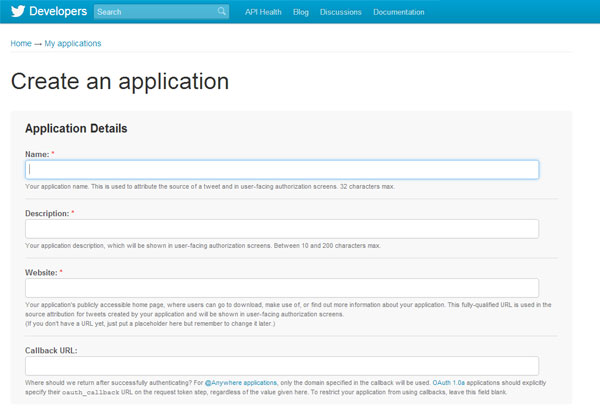
How to create an application in Twitter

Once you've created your application you will see there is a new API Key and API Secret.
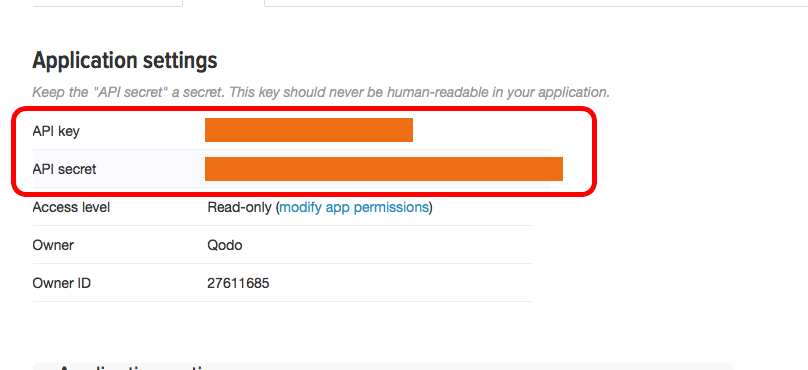
Once you've created your application you will see there is a new API Key and API Secret.

Your new twitter app will have an API key and API secret

You will see a section called Your access token. Here you need to click Create my access token and the page will refresh with your new token,
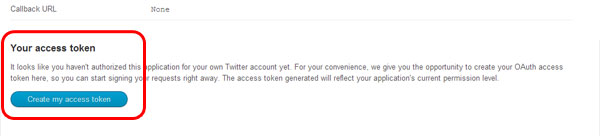
Create a new access token in your new twitter app

Final step is to authorise your domain. I'm not 100% sure if this is needed but I was getting error message until I did this. Here you want to enter the domain of your site that is accessing the feed.
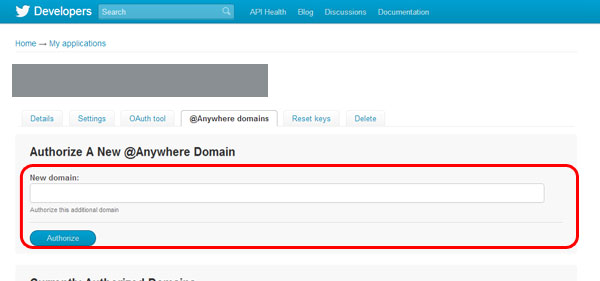
How to create an application in Twitter

Usage

Once you've created your new application, have the necessary tokens and have authorised your domain you call the TwitterX snippet which will load your statuses using the details you have just generated:

Parameters

  • twitter_consumer_key - your twitter consumer token (REQUIRED)
  • twitter_consumer_secret - your twitter consumer secret (REQUIRED)
  • twitter_access_token - your twitter access token (REQUIRED)
  • twitter_access_token_secret - your twitter access token secret (REQUIRED)
  • limit - limit how many statuses to display (default: 5)
  • timeline - which twitter timeline to load (default: user_timeline)
  • chunk - which chunk to load when rendering the statuses (default: TwitterXTpl)
  • cache - how many seconds to cache the twitter data feed (default: 7200)
  • screen_name - which user(s) you would like to load (comma separated) thanks to @hvoort
  • include_rts - should this include retweets (default: 1)
  • exclude_replies - should this exclude replies (default: 0)
  • cache_id - unique ID for caching in case you want to view multiple feeds or different feeds (default: TwitterX)
  • toPlaceholder - a placeholder ID if you want to use content as a placeholder instead of outputting directly (default: '')
  • search - search Twitter using a search value. When using this parameter, screen_name and timeline are ignored. (example: &search=`MODX`)

Loading timelines

The snippet defaults to user_time line but you can load any of these:

  • public_timeline
  • friends_timeline
  • user_timeline
  • home_timeline
  • mentions
  • retweeted_by_me this is no longer available in the 1.1 API!
  • retweeted_to_me
  • retweets_of_me

Searching Twitter

TwitterX now supports basic Twitter searches using the &search parameter:

&search=`MODX`

When using this parameter, screen_name and timeline are ignored.

TwitterXFormat

Use this snippet in your chunk placeholders to format the status text and automatically link any search, usernames or topics:

Chunk options

The package comes with a chunk for displaying the statuses called TwitterXTpl. You can customise this by using the following placeholders:

  • created_at - date status was created
  • source - source of the Tweet (application like web, iOS etc)
  • id - status id on Twitter
  • text - status main text
  • name - Twitter name
  • screen_name - Twitter username
  • profile_image_url - Twitter avatar image url for this user
  • location - This users location
  • url - This users URL (if specified)
  • description - This users profile information

And for retweets, you can use these

  • retweet_created_at - date status was created
  • retweet_source - source of the Tweet (application like web, iOS etc)
  • retweet_id - status id on timeline
  • retweet_id_str - status id on Twitter (twitter.com/user/statuses/id_str)
  • retweet_text - status main text
  • retweet_name - Twitter name
  • retweet_screen_name - Twitter username
  • retweet_profile_image_url - Twitter avatar image url for this user
  • retweet_location - This users location
  • retweet_url - This users URL (if specified)
  • retweet_description - This users profile information